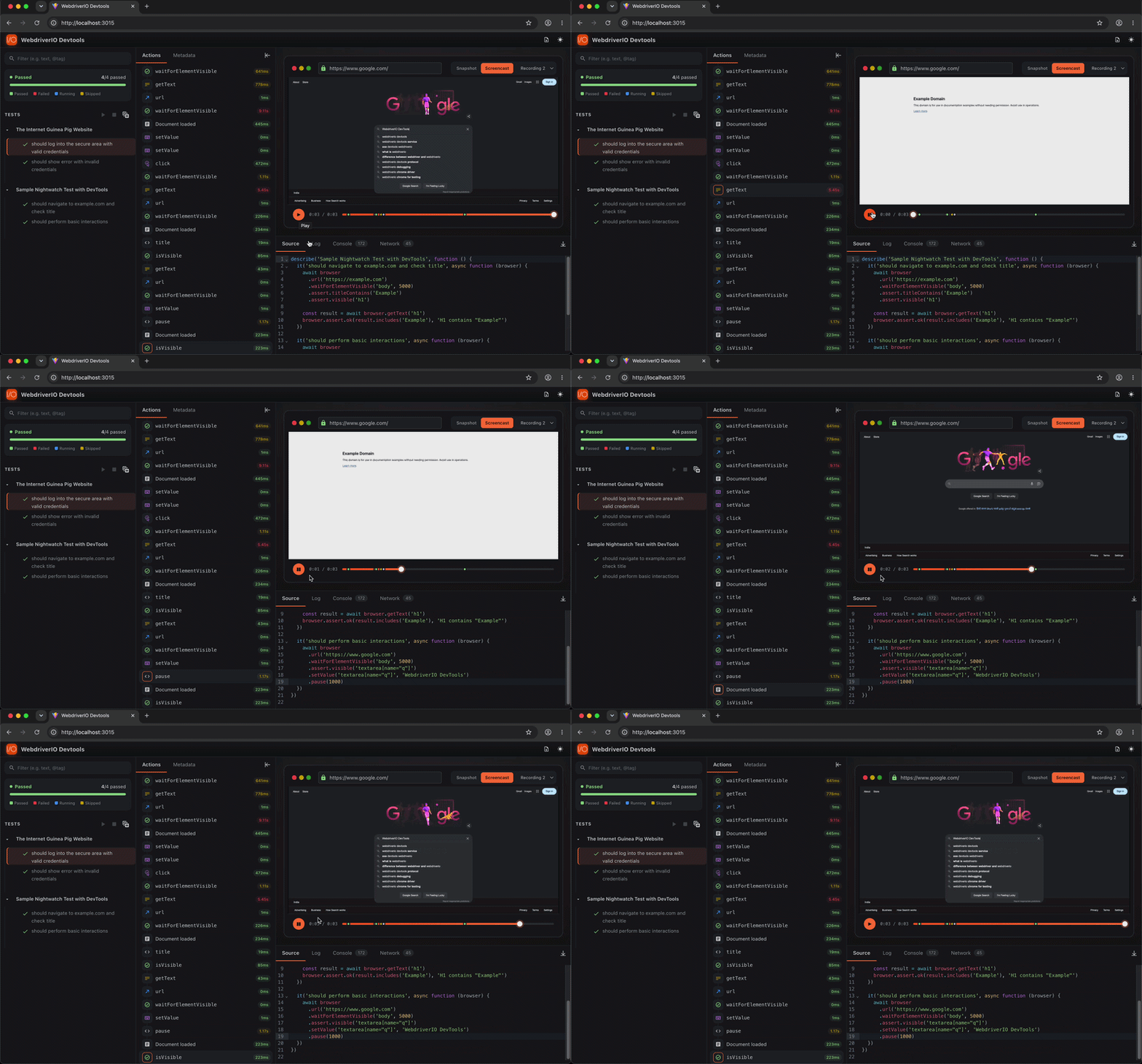
Session Screencast
Records browser sessions as .webm videos. Videos are displayed in the DevTools UI alongside the snapshot and DOM mutation views.
Available across all three adapters - WebdriverIO, Selenium WebDriver, and Nightwatch.js. The capture mode differs per framework (CDP push where possible, polling otherwise - see Browser Support below).
Demo
Setup
Screencast encoding requires ffmpeg on PATH and the fluent-ffmpeg package:
# Install ffmpeg - https://ffmpeg.org/download.html
brew install ffmpeg        # macOS
sudo apt install ffmpeg    # Ubuntu/Debian

# Install fluent-ffmpeg
npm install fluent-ffmpeg
Configuration
services: [
  [
    'devtools',
    {
      screencast: {
        enabled: true,
        captureFormat: 'jpeg',
        quality: 70,
        maxWidth: 1280,
        maxHeight: 720,
      }
    }
  ]
]
Options
| Option | Type | Default | Description |
|---|---|---|---|
enabled | boolean | false | Enable session recording |
captureFormat | 'jpeg' | 'png' | 'jpeg' | Frame image format. Chrome/Chromium only - controls the format Chrome sends over CDP. Ignored in polling mode (Firefox, Safari) where screenshots are always PNG. Does not affect the output video container, which is always .webm |
quality | number | 70 | JPEG compression quality 0-100. Only applies in Chrome/Chromium CDP mode with captureFormat: 'jpeg' |
maxWidth | number | 1280 | Maximum frame width in pixels. Chrome/Chromium only - Chrome scales frames before sending over CDP. Ignored in polling mode |
maxHeight | number | 720 | Maximum frame height in pixels. Chrome/Chromium only - same as above |
pollIntervalMs | number | 200 | Screenshot interval in milliseconds for non-Chrome browsers (polling mode). Lower = smoother video but more WebDriver round-trips during test execution |
Browser Support
Recording works across all major browsers using automatic mode selection:
| Browser | Mode | Notes |
|---|---|---|
| Chrome / Chromium / Edge | CDP push | Chrome pushes frames over the DevTools Protocol. Efficient - no impact on test command timing |
| Firefox / Safari / others | BiDi polling | Falls back to calling browser.takeScreenshot() at pollIntervalMs intervals. Works wherever WebDriver screenshots are supported; adds a small overhead proportional to the interval |
No configuration change is needed to switch modes - the service detects browser capabilities automatically and logs which mode is active.
Behaviour
- Recording starts when the browser session opens and stops when it closes.
- Leading blank frames (captured before the first URL navigation) are automatically trimmed so videos begin at the first meaningful page action.
- If
browser.reloadSession()is called mid-run, the service finalises the current recording and starts a fresh one for the new session. Each session produces its own.webmfile. - When multiple recordings exist, the DevTools UI shows a Recording N dropdown to switch between them.
Where output files land
The directory each adapter picks is slightly different - they all share the same resolver in @wdio/devtools-core but feed it different inputs:
| Adapter | Output location |
|---|---|
| WebdriverIO | outputDir if explicitly set in wdio.conf.ts, otherwise rootDir (the dir containing the config). Avoid setting outputDir just to control video paths - WDIO redirects worker logs there too. |
| Selenium | Directory of the test file that just ran, falling back to process.cwd(). |
| Nightwatch | Directory of the test file, falling back to the directory containing nightwatch.conf.*, then process.cwd(). |
Directories under node_modules/ are skipped on the Selenium/Nightwatch path so symlinked workspaces don't dump videos into a dependency folder.
Output Files
Live mode streams captured data to the dashboard over WebSocket and writes no trace file to disk — for a portable artifact, use trace mode (trace.zip). The only file live mode writes is the screencast video, and only when screencast.enabled: true. Filenames are adapter-specific (the framework name appears in the prefix):
| Adapter | Screencast video |
|---|---|
| WebdriverIO | wdio-video-{sessionId}.webm |
| Selenium | selenium-video-{sessionId}.webm |
| Nightwatch | nightwatch-video-{sessionId}.webm |
