Slack Reporter Reporter
wdio-slack-reporter is a 3rd party package, for more information please see GitHub | npm




Reporter from WebdriverIO using Incoming webhook and Web API to send results to Slack.
📢 Important Notice
Migration to filesUploadV2 due to files.upload deprecation
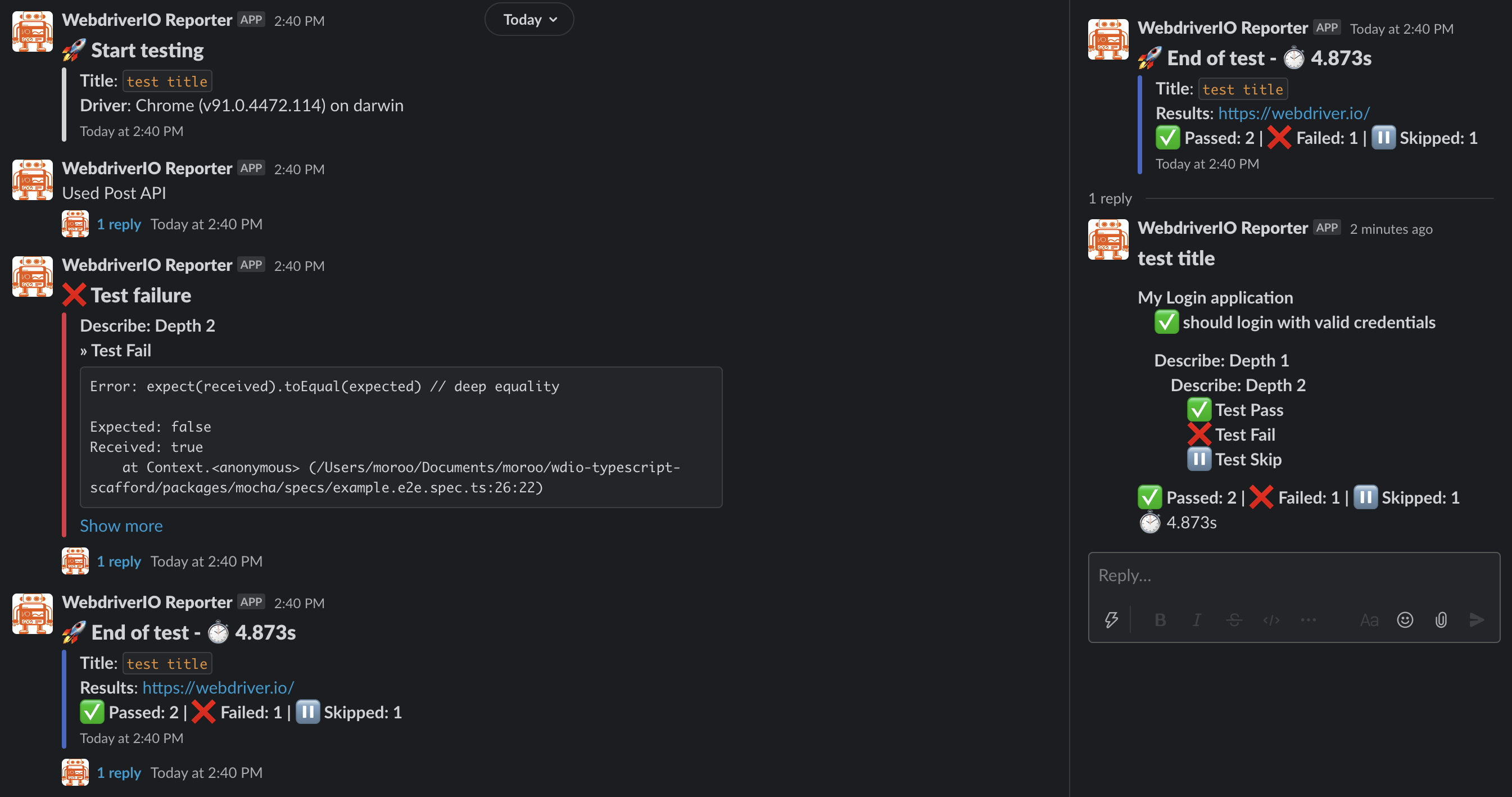
Slack notification screenshot
WebdriverIO Version Support Policy
The WebdriverIO versions supported in this project follow WebdriverIO's support policy. WebdriverIO's support policy can be checked here.
Installation
The easiest way is to keep @moroo/wdio-slack-reporter as a devDependency in your package.json.
{
  "devDependencies": {
    "@moroo/wdio-slack-reporter": "^9.0.0"
  }
}
You can simple do it by:
- NPM
npm install @moroo/wdio-slack-reporter --save-dev
- Yarn
yarn add -D @moroo/wdio-slack-reporter
Instructions on how to install WebdriverIO can be found here.
Configuration
In order to use the reporter you need to add slack to your reporters array in wdio.conf.js
// wdio.conf.js
import SlackReporter from '@moroo/wdio-slack-reporter';

export const config: WebdriverIO.Config = {
  reporters: [
    [
      SlackReporter,
      {
        slackOptions: {
          type: 'web-api',
          channel: process.env.SLACK_CHANNEL || 'Cxxxxxxxxxx',
          token: process.env.SLACK_BOT_TOKEN || 'xoxb-xxxxxxxxxx-xxxxxx...',
        },
      },
    ],
  ],
};
Configuration Options
The following configuration options are supported.
For notifications to be sent, You must set webhook or web-api.
If both web-api and webhook are set, web-api is used.
Webhook (Incoming Webhook)
webhook (Required)
Incoming Webhook of the slack channel to which notifications should be sent. If the URL is not configured, notifications will not be sent.
- Scope:
webhook - Type:
string
username (Optional)
The value of username will appear in the slack notification as the user who sent it.
- Scope:
webhook - Type:
string - Default:
"WebdriverIO Reporter"
icon_url (Optional)
The url of the Icon to be displayed in the slack
- Scope:
webhook - Type:
string - Default:
"https://webdriver.io/img/webdriverio.png"
[!TIP] Besides these, all options defined in the Slack Incoming Webhook specification can also be used.
Web API (Slack Bot)
token (Required)
Web API of the slack channel to which notifications should be sent. A bot user token is required. Bot access tokens always begin with xoxb.
The bot token requires the OAuth scope of chat:write, files:write.
See below for more details.
- Scope:
web-api - Type:
string
channel (Required)
Channel, private group, or IM channel to send message to. Can be an encoded ID, or a name. See below for more details.
"How to find channel ID" - stackoverflow -
- Scope:
web-api - Type:
string
[!TIP] Besides these, all options defined in the Slack Web API specification can also be used.
uploadScreenshotOfFailedCase (Optional)
Set this option to true to attach a screenshot to the failed case.
- Scope:
web-api - Type:
boolean - Default:
true
notifyDetailResultThread (Optional)
This option only works when the notifyTestFinishMessage option is true.
Set this option to true if you want to add thread with details of results to notification of test results posted to Slack.
- Scope:
web-api - Type:
boolean - Default:
true
filterForDetailResults (Optional)
This option only works when the notifyDetailResultThread option is true.
Add the filter you want to this option to the array and the detailed results will be filtered out in Slack and sent to the thread.
(If there are no filters (array is empty or undefined), all filters are applied.)
Filter list: passed, failed, pending, skipped
- Scope:
web-api - Type:
array (passed | failed | pending | skipped) - Default:
['passed', 'failed', 'pending', 'skipped']
createScreenshotPayload (Optional)
This option customizes the payload that is uploaded of the screenshot for the failure of the test.
- Scope:
web-api - Type:
function
createResultDetailPayload (Optional)
This option customizes the payload that is notified of the detailed results of the test.
- Scope:
web-api - Type:
function
Common
title (Optional)
Set this option to the test title.
- Scope:
webhook,web-api - Type:
string
resultsUrl (Optional)
Provide a link to the test results. It is a clickable link in the notification.
- Scope:
webhook,web-api - Type:
string
notifyTestStartMessage (Optional)
Set this option to true to send notifications test start.
- Scope:
webhook,web-api - Type:
boolean - Default:
true
notifyFailedCase (Optional)
Set this option to true to attach failed cases in the test results reported to Slack.
- Scope:
webhook,web-api - Type:
boolean - Default:
true
notifyTestFinishMessage (Optional)
Set this option to true to send notifications test finished.
- Scope:
webhook,web-api - Type:
boolean - Default:
true
useScenarioBasedStateCounts (Optional) - Only Cucumber
Set this option to true to change the state count from test (steps) based to scenario-based. (Only Cucumber)
- Scope:
webhook,web-api - Type:
boolean - Default:
false
emojiSymbols (Optional)
This option changes the emoji set by default.
- Scope:
webhook,web-api - Type:
object - Default:
- passed - ✅
:white_check_mark: - failed - ❌
:x: - skipped - ⏸
:double_vertical_bar: - pending - ❔
:grey_question: - start - 🚀
:rocket: - finished - 🏁
:checkered_flag: - watch - ⏱
:stopwatch:
- passed - ✅
createStartPayload (Optional)
This option customizes the payload that is notified at the start of the test.
- Scope:
webhook,web-api - Type:
function
createFailedTestPayload (Optional)
This option customizes the payload that is notified at the failure of the test.
- Scope:
webhook,web-api - Type:
function
createResultPayload (Optional)
This option customizes the payload that is notified of the results of the test.
- Scope:
webhook,web-api - Type:
function
Use the Incoming Webhook
If you are using webhook, can not thread and upload.
Therefore, functions related to upload and thread are not available.
Configuration Example
// wdio.conf.js
import SlackReporter from "@moroo/wdio-slack-reporter";

export.config = {
  reporters: [
    [
      SlackReporter, {
        // Set the Slack Options used webhook.
        slackOptions: {
          type: 'webhook',
          webhook: process.env.SLACK_WEBHOOK_URL || "https://hooks.slack.com/........",
          username: "WebdriverIO Reporter",
          "icon-url": "https://webdriver.io/img/webdriverio.png",
        },
        // Set the Title of Test.
        title: 'Slack Reporter Test',
        // Set the Test Results URL.
        resultsUrl: process.env.JENKINS_URL,
        // Set the notification of Test Finished
        notifyTestFinishMessage: true,
        // Set the scenario-based state count (Only Cucumber)
        useScenarioBasedStateCounts: true,
        // Customize Slack Emoji Symbols.
        emojiSymbols: {
          passed: ':white_check_mark:',
          failed: ':x:',
          skipped: ':double_vertical_bar:',
          pending: ':grey_question:',
          start: ':rocket:',
          finished: ':checkered_flag:',
          watch: ':stopwatch:'
        },
        // Override the createStartPayload function.
        createStartPayload: function (runnerStats: RunnerStats): IncomingWebhookSendArguments {
          const payload: IncomingWebhookSendArguments = {
            // do something...
          }
          return payload;
        },
        // Override the createFailedTestPayload function.
        createFailedTestPayload: function (testStats: TestStats): IncomingWebhookSendArguments {
          const payload: IncomingWebhookSendArguments = {
            // do something...
          }
          return payload;
        },
        // Override the createResultPayload function.
        createResultPayload: function (runnerStats: RunnerStats, stateCounts: StateCount): IncomingWebhookSendArguments {
          const payload: IncomingWebhookSendArguments = {
            // do something...
          }
          return payload;
        }
      }
    ],
  ],
};
Use the Web API
To use the api, you need a scopes like the one below.
chat:write, files:write. See below for more details.
Configuration Example
// wdio.conf.js
import SlackReporter from "@moroo/wdio-slack-reporter";

export.config = {
  reporters: [
    [
      SlackReporter, {
        // Set the Slack Options used web-api.
        slackOptions: {
          type: 'web-api',
          token: process.env.SLACK_BOT_TOKEN || "xoxb-xxxxxxxxxx-xxxxxx...",,
          channel: process.env.SLACK_CHANNEL || "Cxxxxxxxxxx",
          // Set this option to true to attach a screenshot to the failed case.
          uploadScreenshotOfFailedCase: true,
          // Set this option to true if you want to add thread with details of results to notification of test results posted to Slack.
          notifyDetailResultThread: true,
          // Set the Filter for detail results. (array is empty or undefined, all filters are applied.)
          filterForDetailResults: [
            'passed',
            'failed',
            'pending',
            'skipped'
          ],
          // Override the createScreenshotPayload function.
          createScreenshotPayload: function (testStats: TestStats, screenshotBuffer: string | Buffer<ArrayBufferLike>): FilesUploadArguments {
            const payload: FilesUploadArguments = {
              // do something...
            }
            return payload;
          },
          // Override the createResultDetailPayload function.
          createResultDetailPayload: function (runnerStats: RunnerStats, stateCounts: StateCount): ChatPostMessageArguments {
            const payload: ChatPostMessageArguments = {
              // do something...
            }
            return payload;
          }
        },
        // Set the Title of Test.
        title: 'Slack Reporter Test',
        // Set the Test Results URL.
        resultsUrl: process.env.JENKINS_URL,
        // Set the notification of Test Finished
        notifyTestFinishMessage: true,
        // Set the scenario-based state count (Only Cucumber)
        useScenarioBasedStateCounts: true,
        // Customize Slack Emoji Symbols.
        emojiSymbols: {
          passed: ':white_check_mark:',
          failed: ':x:',
          skipped: ':double_vertical_bar:',
          pending: ':grey_question:',
          start: ':rocket:',
          finished: ':checkered_flag:',
          watch: ':stopwatch:'
        },
        // Override the createStartPayload function.
        createStartPayload: function (runnerStats: RunnerStats): IncomingWebhookSendArguments {
          const payload: IncomingWebhookSendArguments = {
            // do something...
          }
          return payload;
        },
        // Override the createFailedTestPayload function.
        createFailedTestPayload: function (testStats: TestStats): IncomingWebhookSendArguments {
          const payload: IncomingWebhookSendArguments = {
            // do something...
          }
          return payload;
        },
        // Override the createResultPayload function.
        createResultPayload: function (runnerStats: RunnerStats, stateCounts: StateCount): IncomingWebhookSendArguments {
          const payload: IncomingWebhookSendArguments = {
            // do something...
          }
          return payload;
        }
      }
    ],
  ],
};
Supported API
getResultsUrl
type:
() => string | undefined
Get the results url.
// getResultsUrl.spec.ts
import SlackReporter from '@moroo/wdio-slack-reporter';

describe('Get the resultsUrl value', function () {
  before(function () {
    const resultsUrl = SlackReporter.getResultsUrl();
    if (resultsUrl) {
      // do something...
    }
  });
  it('Do something', function () {
    // do something...
  });
});
setResultsUrl
type:
(url: string) => void
Set the results url.
(This is useful if the url with test results changes every time.)
// setResultsUrl.spec.ts
import SlackReporter from '@moroo/wdio-slack-reporter';
import { RESULTS_URL } from '../constants';

describe('Set the resultsUrl value', function () {
  before(function () {
    const resultsUrl = RESULTS_URL + new Date().toISOString();
    SlackReporter.setResultsUrl(resultsUrl);
  });
  it('Do something', function () {
    // do something...
  });
});
uploadFailedTestScreenshot
type:
(data: string | Buffer<ArrayBufferLike>) => void
Add a screenshot as a thread to the failed test notification.
(If you are using a webhook this will print a warning and do nothing.)
// terminal console
WARN @moroo/slack-wdio-reporter: Not using web-api or disabled notifyFailedCase or uploadScreenshotOfFailedCase options.
// wdio.conf.js
export.config = {
  afterTest: async function (test, context, result) {
    if (error) {
      const result = await browser.takeScreenshot();
      SlackReporter.uploadFailedTestScreenshot(result);
    }
  }
}
postMessage
type:
(payload: ChatPostMessageArguments) => Promise<WebAPICallResult>
Post a message to Slack.
(If you are using a webhook this will throw an error.)
// terminal console
ERROR @moroo/slack-wdio-reporter: Not using web-api.
// post.spec.ts
import SlackReporter, {
  ChatPostMessageArguments,
  WebAPICallResult,
} from '@moroo/wdio-slack-reporter';

describe('Post Function Test', function () {
  it('Post a message', async function () {
    const payload: ChatPostMessageArguments = {
      // do something...
    };
    const result: WebAPICallResult = await SlackReporter.post(payload);
  });
});
upload
type:
({ payload: FilesUploadArguments; options: FilesUploadV2Options }) => Promise<WebAPICallResult & {files: FilesCompleteUploadExternalResponse[];}>
Upload a file to Slack.
(If you are using a webhook this will throw an error.)
// terminal console
ERROR @moroo/slack-wdio-reporter: Not using web-api.
// upload.spec.ts
import SlackReporter, {
  FilesUploadArguments,
  WebAPICallResult,
} from '@moroo/wdio-slack-reporter';

describe('Upload Function Test', function () {
  it('Upload a files', async function () {
    const payload: FilesUploadArguments = {
      // do something...
    };
    const options: FilesUploadV2Options = {
      waitForUpload: true,
      retry: 3,
      interval: 1000,
    };
    const result: WebAPICallResult = await SlackReporter.upload({
      payload,
      options,
    });
  });
});
send
type:
(payload: IncomingWebhookSendArguments) => Promise<IncomingWebhookResult>
Send a message to Slack.
(If you are using a web-api this will throw an error.)
// terminal console
ERROR @moroo/slack-wdio-reporter: Not using webhook.
// send.spec.ts
import SlackReporter, {
  IncomingWebhookSendArguments,
  IncomingWebhookResult,
} from '@moroo/wdio-slack-reporter';

describe('Sand Function Test', function () {
  it('Send a message', async function () {
    const payload: IncomingWebhookSendArguments = {
      // do something...
    };
    const result: IncomingWebhookResult = await SlackReporter.send(payload);
  });
});
Add Screenshot
If you want to add a screenshot as a thread to the failed test notification, added the uploadFailedTestScreenshot function after taking the screenshot.
// wdio.conf.js
export.config = {
  afterTest: async function (test, context, result) {
    if (error) {
      const result = await browser.takeScreenshot();
      SlackReporter.uploadFailedTestScreenshot(result);
    }
  }
}
Known Issues
Unsynced
If the following error occurs, set reporterSyncInterval, reporterSyncTimeout in wdio.conf.js.
ERROR @wdio/runner: Error: Some reporters are still unsynced: SlackReporter
//wdio.conf.js
export.config = {
  //
  // Determines in which interval the reporter should check if they are synchronized if they report their logs asynchronously (e.g. if logs are streamed to a 3rd party vendor).
  reporterSyncInterval: 500,
  // Determines the maximum time reporters have to finish uploading all their logs until an error is being thrown by the testrunner.
  reporterSyncTimeout: 20000,
}
Jasmine Option - expectationResultHandler
Adding the uploadFailedTestScreenshot function here doesn't work either.
This is because the function works after every test, so the current test is unknown.
// wdio.conf.js
export.config = {
  jasmineOpts: {
    // Jasmine default timeout
    defaultTimeoutInterval: 60000,
    //
    // The Jasmine framework allows interception of each assertion in order to log the state of the application
    // or website depending on the result. For example, it is pretty handy to take a screenshot every time
    // an assertion fails.
    expectationResultHandler: function (passed, assertion) {
      if (passed) {
        return;
      }
      /*
        Adding the uploadFailedTestScreenshot function here doesn't work either.
        This is because the function works after every test, so the current test is unknown.

        [x] const result = await browser.takeScreenshot();
        [x] SlackReporter.uploadFailedTestScreenshot(result);
      */
    },
  },

  // Add it here.
  afterTest: async function (test, context, result) {
    if (result.error) {
      const result = await browser.takeScreenshot();
      SlackReporter.uploadFailedTestScreenshot(result);
    }
  }
}
