Junit Reporter
A WebdriverIO reporter that creates Jenkins compatible XML based JUnit reports
Installation
The easiest way is to keep @wdio/junit-reporter as a devDependency in your package.json, via:
npm install @wdio/junit-reporter --save-dev
Instructions on how to install WebdriverIO can be found here.
Output
This reporter will output a report for each runner, so in turn you will receive an XML report for each spec file. Below are examples of XML output given different scenarios in the spec file.
Single describe block
describe('a test suite', () => {
    it('a test case', function () {
      // do something
      // assert something
    });
});
becomes
<testsuites>
    <testsuite name="a test suite" timestamp="2019-04-18T13:45:21" time="11.735" tests="0" failures="0" errors="0" skipped="0">
        <properties>
          <property name="specId" value="0"/>
          <property name="suiteName" value="a test suite"/>
          <property name="capabilities" value="chrome"/>
          <property name="file" value=".\test\specs\asuite.spec.js"/>
        </properties>
        <testcase classname="chrome.a_test_case" name="a_test_suite_a_test_case" time="11.706"/>
    </testsuite>
</testsuites>
Nested describe block
describe('a test suite', () => {
    describe('a nested test suite', function() {
        it('a test case', function () {
          // do something
          // assert something
        });
    });
});
becomes
<testsuites>
    <testsuite name="a test suite" timestamp="2019-04-18T13:45:21" time="11.735" tests="0" failures="0" errors="0" skipped="0">
    <properties>
      <property name="specId" value="0"/>
      <property name="suiteName" value="a test suite"/>
      <property name="capabilities" value="chrome"/>
      <property name="file" value=".\test\specs\asuite.spec.js"/>
    </properties>
  </testsuite>
  <testsuite name="a nested test suite" timestamp="2019-04-18T13:45:21" time="11.735" tests="0" failures="0" errors="0" skipped="0">
    <properties>
      <property name="specId" value="0"/>
      <property name="suiteName" value="a nested test suite"/>
      <property name="capabilities" value="chrome"/>
      <property name="file" value=".\test\specs\asuite.spec.js"/>
    </properties>
    <testcase classname="chrome.a_test_case" name="a nested test suite a test case" time="11.706"/>
  </testsuite>
</testsuites>
Multiple describe block
describe('a test suite', () => {
    it('a test case', function () {
      // do something
      // assert something
    });
});
describe('a second test suite', () => {
    it('a second test case', function () {
      // do something
      // assert something
    });
});
becomes
<testsuites>
    <testsuite name="a test suite" timestamp="2019-04-18T13:45:21" time="11.735" tests="0" failures="0" errors="0" skipped="0">
    <properties>
      <property name="specId" value="0"/>
      <property name="suiteName" value="a test suite"/>
      <property name="capabilities" value="chrome"/>
      <property name="file" value=".\test\specs\asuite.spec.js"/>
      <testcase classname="chrome.a_test_case" name="a nested test suite a test case" time="11.706"/>
    </properties>
  </testsuite>
  <testsuite name="a second test suite" timestamp="2019-04-18T13:45:21" time="11.735" tests="0" failures="0" errors="0" skipped="0">
    <properties>
      <property name="specId" value="0"/>
      <property name="suiteName" value="a second test suite"/>
      <property name="capabilities" value="chrome"/>
      <property name="file" value=".\test\specs\asuite.spec.js"/>
    </properties>
    <testcase classname="chrome.a_second_test_case" name="a_second_test_suite_a_second_test_case" time="11.706"/>
  </testsuite>
</testsuites>
Failures and Errors
All test case failures are mapped as JUnit test case errors. A failed test case due to assertion failure or error will look like:
<testcase classname="chrome.a_test_case" name="a_test_suite_a_test_case" time="0.372">
  <failure message="Error: some error"/>
    <system-err>
        <![CDATA[
Error: some assertion failure
    at UserContext.<anonymous> (C:\repo\webdriver-example\test\specs/a_test_suite.spec.js:22:17)
]]>
  </system-err>
</testcase>
Configuration
The following example shows a basic configuration for this reporter:
// wdio.conf.js
export const config = {
    // ...
    reporters: [['junit', {
        outputDir: './',
        outputFileFormat: () => `test-results.xml`;
    }]],
    // ...
};
The following options are supported:
outputDir
- Type
String
Define a directory where your XML files should get stored. Ignored if either logFile or setLogFile are defined.
outputFileFormat
- Type
Object- Default
(opts) => `wdio-${opts.cid}-junit-reporter.log`
Function for defining the filename format for the reporter log files. Ignored if either logFile or setLogFile
are defined.
The function accepts an object input parameter with the cid and capabilities keys.
Example:
// wdio.conf.js
export const config = {
    // ...
    reporters: [['junit', {
        outputDir: './',
        outputFileFormat: (opts) => `results-${opts.cid}-${opts.capabilities.browserName}.xml`,
    }]],
    // ...
};
logFile
- Type
String
Path to the reporter log file relative to the current directory. Overrides outputDir and outputFileFormat.
Ignored if setLogFile is defined.
Example:
// wdio.conf.js
export const config = {
    // ...
    reporters: [['junit', {
        logFile: './reports/junit-report.xml',
    }]],
    // ...
};
setLogFile
- Type
Object
Function for defining the path for the reporter log files. Overrides outputDir, outputFileFormat, and logFile.
The function accepts two input parameters: cid and name (the reporter name, set to junit).
Example:
// wdio.conf.js
export const config = {
    // ...
    reporters: [['junit', {
        setLogFile: (cid, name) => `./reports/results-${cid}-${name}.xml`,
    }]],
    // ...
};
stdout
- Type
boolean- Default
false
Output the generated XML to the console instead of creating a log file.
writeStream
- Type
WriteStream
Set a stream to which the generated XML should be output, instead of creating a log file.
Note: logFile must not be set, unless stdout is set to true.
suiteNameFormat
- Type
Regex | Object- Default
/[^a-zA-Z0-9@]+/
Format the generated name of a test suite, using custom regex or a function.
The function accepts an object input parameter with the name and suite keys.
Example with Regex:
// wdio.conf.js
export const config = {
    // ...
    reporters: [['junit', {
        outputDir: './',
        suiteNameFormat: /[^a-zA-Z0-9@]+/
    }]],
    // ...
};
Example with function:
// wdio.conf.js
export const config = {
    // ...
    reporters: [['junit', {
        outputDir: './',
        suiteNameFormat: ({name, suite}) => `suite-${name}-${suite.title}`,
    }]],
    // ...
};
classNameFormat
- Type
Object
Format the generated classname of a test case.
The function accepts an object input parameter with the packageName, activeFeatureName
(Cucumber only), and suite (non-Cucumber only) keys.
Default (Cucumber): (opts) => `${opts.packageName}${opts.activeFeatureName}`
Default (others): (opts) => `${opts.packageName}.${(opts.suite.fullTitle || opts.suite.title).replace(/\s/g, '_')}`
Example (Cucumber):
// wdio.conf.js
export const config = {
    // ...
    reporters: [['junit', {
        outputDir: './',
        classNameFormat: ({packageName, activeFeatureName}) => `class-${packageName}-${activeFeatureName}`,
    }]],
    // ...
};
Example (others):
// wdio.conf.js
export const config = {
    // ...
    reporters: [['junit', {
        outputDir: './',
        classNameFormat: ({packageName, suite}) => `class-${packageName}-${suite.title}`,
    }]],
    // ...
};
addFileAttribute
- Type
Boolean- Default
false
Adds a file attribute to each testcase. The value of this attribute matches the filepath property of the parent test
suite. This config is primarily for CircleCI, but may break on other CI platforms.
Example simplified XML:
<testsuite>
    <properties>
        <property name="file" value="file://./path/to/test/file.js"/>
    </properties>
    <testcase file="file://./path/to/test/file.js">
        <!-- ... -->
    </testcase>
</testsuite>
packageName
- Type
String
You can break out packages by an additional level by setting 'packageName'. For example, if you wanted to iterate over a test suite with a different environment variable set:
Default (Cucumber): CucumberJUnitReport-${sanitizedCapabilities}
Default (others): ${sanitizedCapabilities}
Example:
// wdio.conf.js
export const config = {
    // ...
    reporters: [['junit', {
        outputDir: './',
        packageName: process.env.USER_ROLE // chrome.41 - administrator
    }]],
    // ...
};
errorOptions
- Type
Object- Default
errorOptions: { error: "message" }
Allows to set various combinations of error notifications inside xml.
Given a Jasmine test like expect(true).toBe(false, 'my custom message') you will get this test error:
{
    matcherName: 'toBe',
    message: 'Expected true to be false, \'my custom message\'.',
    stack: 'Error: Expected true to be false, \'my custom message\'.\n    at UserContext.it (/home/mcelotti/Workspace/WebstormProjects/forcebeatwio/test/marco/prova1.spec.js:3:22)',
    passed: false,
    expected: [ false, 'my custom message' ],
    actual: true
}
Therefore you can choose which key will be used where, see the example below.
Example:
// wdio.conf.js
export const config = {
    // ...
    reporters: [['junit', {
        outputDir: './',
        errorOptions: {
            error: 'message',
            failure: 'message',
            stacktrace: 'stack'
        }
    }]],
    // ...
};
addWorkerLogs
- Type
Boolean- Default
false
Attach console logs from the test in the reporter.
Example:
// wdio.conf.js
export const config = {
    // ...
    reporters: [['junit', {
        outputDir: './',
        addWorkerLogs: true
    }]],
    // ...
};
API
addProperty
Add a JUnit testcase property to the currently running test step. The typical usecase for this is adding a link to an issue or a testcase.
Simplified example (Mocha):
import { addProperty } from '@wdio/junit-reporter'

describe('Suite', () => {
    it('Case', () => {
        addProperty('test_case', 'TC-1234')
    })
})
<testsuite name="Suite">
    <testcase classname="chrome.Case" name="Suite Case">
        <properties>
            <property name="test_case" value="TC-1234" />
        </properties>
    </testcase>
</testsuite>
Jenkins Setup
Last but not least you need to tell your CI job (e.g. Jenkins) where it can find the XML file. To do that, add a post-build action to your job that gets executed after the test has run and point Jenkins (or your desired CI system) to your XML test results:
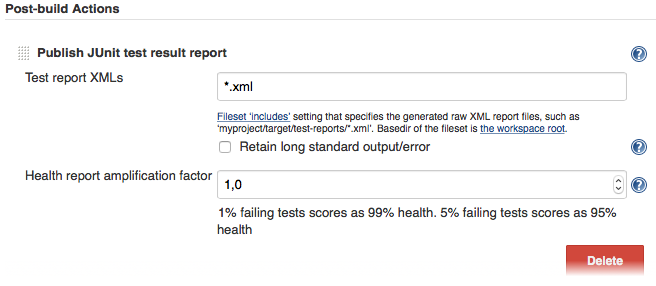
If there is no such post-build step in your CI system, there is probably a plugin for that somewhere on the internet.
For more information on WebdriverIO see the homepage.
