Preserve & Rerun (Compare)
When a test fails, the usual debugging loop is: rerun it, then compare two walls of logs to work out what changed. Preserve & Rerun collapses that into a single click. It snapshots the failing run and re-executes the test in one action, then shows both runs side-by-side in a Compare view aligned command-by-command - so you can see exactly where the two diverged without re-reading anything.
This is the fastest way to diagnose a flaky test: the command that behaved differently between the pass and the fail is highlighted for you, along with the assertion that broke.
Available across all three adapters - WebdriverIO, Selenium WebDriver, and Nightwatch.js.
Demo
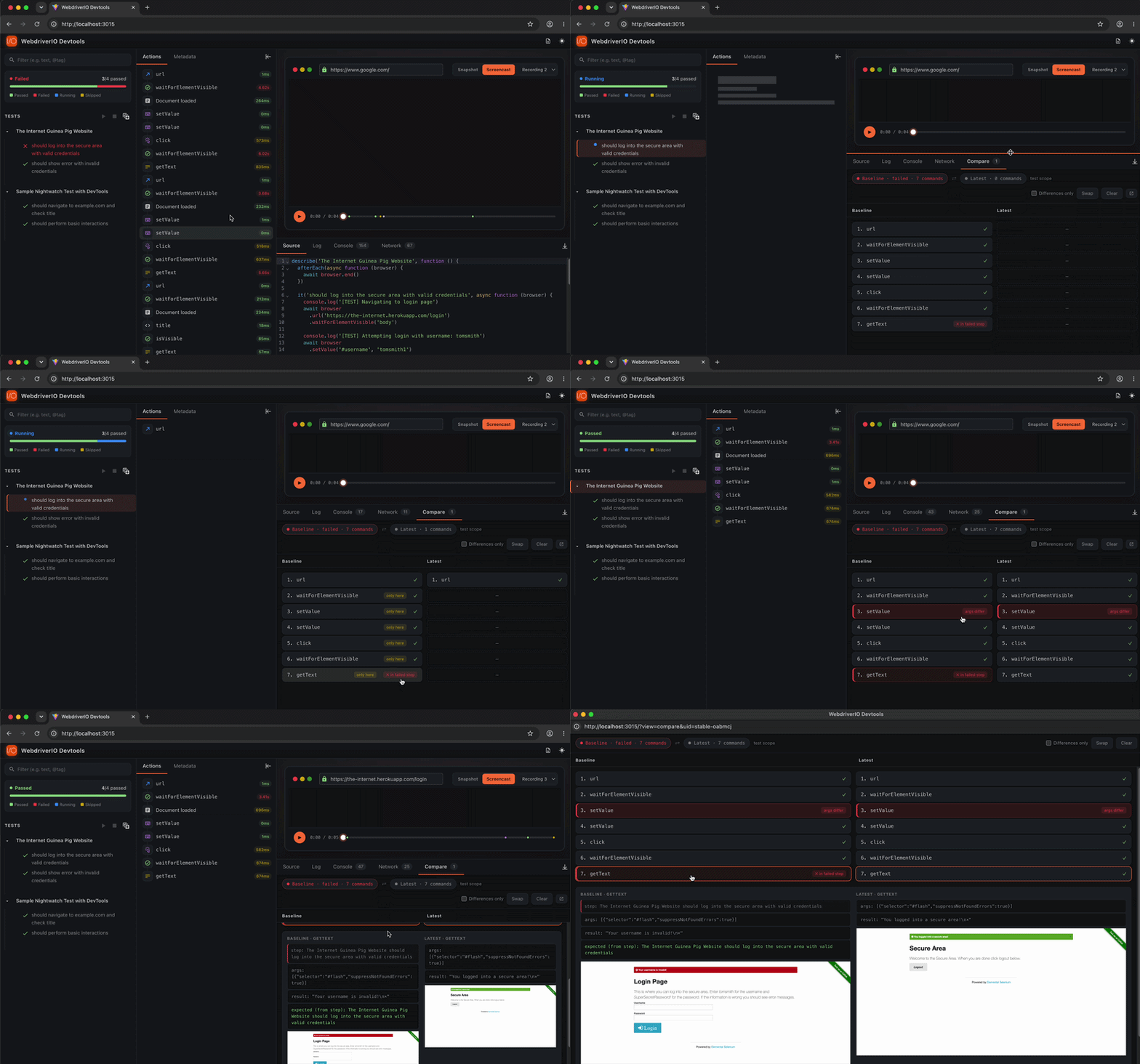
How it works
- Run your tests as normal. When a test finishes in a failed state, hover its row in the sidebar.
- A bug-play icon (🐞▶) appears next to the regular ▶ rerun button. It only shows on failed test/suite rows, wherever a plain rerun is already supported (e.g. Cucumber scenarios at the scenario row, Mocha/Jasmine tests at the test or suite row).
- Click it. DevTools captures a snapshot of the failing run, then re-launches just that test.
- The Compare tab opens with the two runs aligned by command. The point of divergence and the assertion error (Expected vs Received) are called out.
Key Features
- One-click snapshot + rerun - Preserve the failing run and re-execute it in a single action, no code changes or full-suite restart.
- Command-by-command alignment - Both runs are laid out side-by-side and aligned by command, so differences stand out instantly.
- Failure point highlighted - Jumps you straight to the command where the two runs diverged.
- Assertion diff - Shows the assertion that broke with Expected vs Received side-by-side.
- Pop-out window - Open the comparison in a separate, themed window for a roomier view.
- Flaky-test triage - See which command differed between a pass and a fail without re-reading logs.
Limitations
- Cucumber: per-step rerun is disabled because Cucumber's
--namefilter targets scenarios, not individual Gherkin steps. Scenario-level Preserve & Rerun still works.
