测试运行器
WebdriverIO 自带测试运行器,帮助您尽快开始测试。它旨在为您完成所有工作,允许集成第三方服务,并帮助您尽可能高效地运行测试。
WebdriverIO 的测试运行器在 NPM 包 @wdio/cli 中单独打包。
安装方法如下:
- npm
- Yarn
- pnpm
- Bun
npm install @wdio/cli
yarn add @wdio/cli
pnpm add @wdio/cli
bun add @wdio/cli
要查看命令行界面帮助,请在终端中输入以下命令:
$ npx wdio --help

wdio <command>

Commands:
  wdio config                           Initialize WebdriverIO and setup configuration in
                                        your current project.
  wdio install <type> <name>            Add a `reporter`, `service`, or `framework` to
                                        your WebdriverIO project
  wdio repl <option> [capabilities]     Run WebDriver session in command line
  wdio run <configPath>                 Run your WDIO configuration file to initialize
                                        your tests.

Options:
  --version  Show version number                                       [boolean]
  --help     Show help                                                 [boolean]
太好了!现在您需要定义一个配置文件,其中包含所有关于测试、功能和设置的信息。请查看配置文件部分,了解该文件应该是什么样子。
使用 wdio 配置助手,生成配置文件超级简单。只需运行:
$ npx wdio config
...它将启动助手实用程序。
它会向您提问并在不到一分钟的时间内为您生成配置文件。
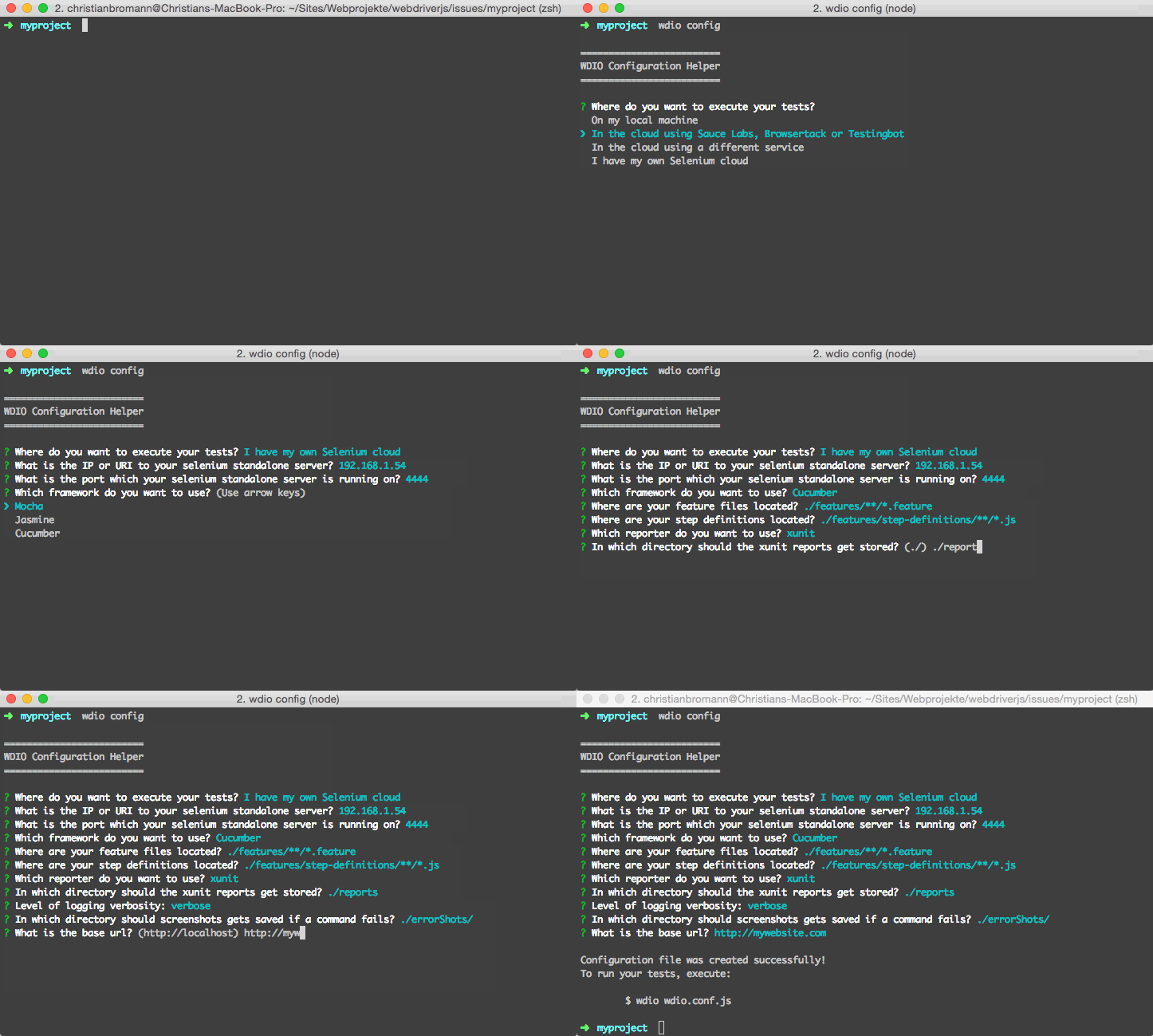
一旦设置好配置文件,您可以通过运行以下命令来启动测试:
npx wdio run wdio.conf.js
您也可以不使用 run 命令初始化测试运行:
npx wdio wdio.conf.js
就是这样!现在,您可以通过全局变量 browser 访问 selenium 实例。
命令
wdio config
config 命令运行 WebdriverIO 配置助手。该助手将询问您关于 WebdriverIO 项目的几个问题,并根据您的回答创建 wdio.conf.js 文件。
示例:
wdio config
选项:
--help            prints WebdriverIO help menu                                [boolean]
--npm             Wether to install the packages using NPM instead of yarn    [boolean]
wdio run
这是运行配置的默认命令。
run 命令初始化您的 WebdriverIO 配置文件并运行您的测试。
示例:
wdio run ./wdio.conf.js --watch
选项:
--help                prints WebdriverIO help menu                   [boolean]
--version             prints WebdriverIO version                     [boolean]
--hostname, -h        automation driver host address                  [string]
--port, -p            automation driver port                          [number]
--user, -u            username if using a cloud service as automation backend
                                                                        [string]
--key, -k             corresponding access key to the user            [string]
--watch               watch specs for changes                        [boolean]
--logLevel, -l        level of logging verbosity
                            [choices: "trace", "debug", "info", "warn", "error", "silent"]
--bail                stop test runner after specific amount of tests have
                        failed                                          [number]
--baseUrl             shorten url command calls by setting a base url [string]
--waitforTimeout, -w  timeout for all waitForXXX commands             [number]
--framework, -f       defines the framework (Mocha, Jasmine or Cucumber) to
                        run the specs                                   [string]
--reporters, -r       reporters to print out the results on stdout      [array]
--suite               overwrites the specs attribute and runs the defined
                        suite                                            [array]
--spec                run a certain spec file or wildcards - overrides specs piped
                        from stdin                                       [array]
--exclude             exclude spec file(s) from a run - overrides specs piped
                        from stdin                                       [array]
--repeat              Repeat specific specs and/or suites N times        [number]
--mochaOpts           Mocha options
--jasmineOpts         Jasmine options
--cucumberOpts        Cucumber options
--tsConfigPath        Custom path for `tsconfig.json` or use wdio config's [tsConfigPath setting](/docs/configurationfile)
注意:自动编译可以通过
tsxENV 变量轻松控制。另请参阅 TypeScript 文档。
wdio install
install 命令允许您通过 CLI 将报告器和服务添加到 WebdriverIO 项目中。
示例:
wdio install service sauce # installs @wdio/sauce-service
wdio install reporter dot # installs @wdio/dot-reporter
wdio install framework mocha # installs @wdio/mocha-framework
如果您想使用 yarn 安装包,可以向命令传递 --yarn 标志:
wdio install service sauce --yarn
如果您的 WDIO 配置文件不在您正在工作的同一文件夹中,您也可以传递自定义配置路径:
wdio install service sauce --config="./path/to/wdio.conf.js"
支持的服务列表
sauce
testingbot
firefox-profile
devtools
browserstack
appium
intercept
zafira-listener
reportportal
docker
wiremock
lambdatest
vite
nuxt
支持的报告器列表
dot
spec
junit
allure
sumologic
concise
reportportal
video
html
json
mochawesome
timeline
支持的框架列表
mocha
jasmine
cucumber
wdio repl
repl 命令允许启动交互式命令行界面来运行 WebdriverIO 命令。它可用于测试目的或仅快速启动 WebdriverIO 会话。
在本地 chrome 中运行测试:
wdio repl chrome
或在 Sauce Labs 上运行测试:
wdio repl chrome -u $SAUCE_USERNAME -k $SAUCE_ACCESS_KEY
您可以应用与run 命令中相同的参数。
